From a diagram to your own language model
The colour of each mark is the block's family on the scene: layers with weights, mixing, data, goal, functions.
Build
Layers with weights, attention, mixture of experts, convolutions, recurrent blocks. Ready templates of modern nets: Llama 3, Qwen3, Gemma 3, DeepSeek V3, gpt-oss, Mamba-2 and hybrids. Write your own block once and use it anywhere.
Train and understand why
On your own GPU or CPU: a live loss curve, your own data — text, images, sound, tables, graphs. The course «your own language model from scratch» — 15 lessons inside the window: every step says why, and after each action shows what changed in the net and what it means.
Understand
Lenses show on the scene where the weights, compute, time, memory and usefulness are. A wire debugger, interventions on a wire and a kernel profiler let you see what happens inside.
Bring in and take out
Import: Hugging Face weights, PyTorch code, ONNX from TensorFlow, Keras and JAX. Export: Hugging Face, GGUF for llama.cpp, ONNX with a numeric check. From Python — zhele.compile("model.zhele").
Helper
Edits the program from a request in words: «add two more floors», «train longer». Its brain is the author's own language model, trained on this same computer. Beta for now.
Experiments and machine
Two nets on the same data and the same time — a fair comparison. The «Machine» tab shows what the GPU computes and how much memory a step takes.
Diagram and text are one program
The strand above and this text are the same net. Edit a block on the scene and the line changes; edit the line and the strand changes.
net:
    input tokens
    emb = embed(tokens)
    pos = positions(emb)
    floors = repeat "Floors" (x = pos, times 4):
        n1 = norm(x)
        att = attention(n1)
        r1 = x + att
        n2 = norm(r1)
        mlp = mlp(n2, hidden 512)
        r2 = r1 + mlp
        output out = r2
    nf = norm "Final norm"(floors)
    head = head(nf)
    output logits = head

train:
    budget: kind steps, value 600
    optimizer: kind AdamW, lr 0.003
embed, norm, attention are blocks with weights. The compiler checks shapes before training and shows an error right where it is.repeat … times 4 is four identical floors in one bubble. On the scene it is a bulge with four bands.train section is the budget, optimizer and schedule. The «Train» button compiles the text into real PyTorch code and runs it.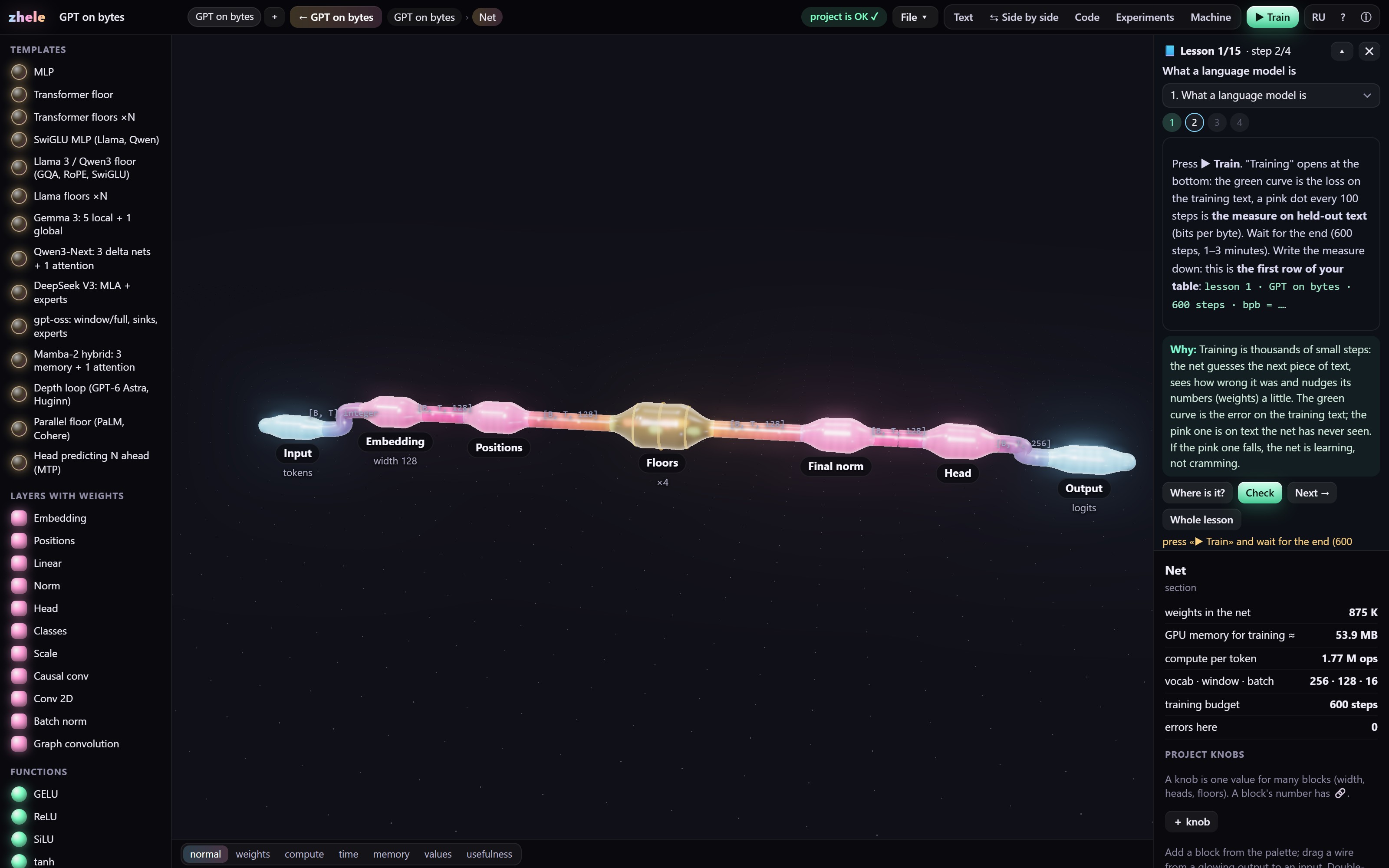
What's new
The program updates itself: every 6 hours it checks for a new version, verifies the author's signature and installs it on the next start.
- Built-in helper (beta): edits the program from a request in words; its brain is the author's language model.
- The key right inside the program: on the first screen «Get a trial key» (7 days, instantly) and «Subscribe» — pay in the browser, the key installs itself, renewals too. The Telegram bot @zhele_keybot is a backup.
- Keys from the cloud bot (ZA2) are accepted: it works around the clock, and the author's key never leaves the author's computer.
- English window: the course in English («Why» on every step), check hints translated, «step» instead of «stride».
- New scene look «fiber»: the whole net is one jelly strand with a glowing core, blocks are bulges on it; drag a wire and the nearest input pulls it in. The old look — «File → Scene look».
- The course «your own language model from scratch» as a card next to the scene: it stays put, folds into one line, every step has «Where is it?».
- Every course step has «Why»: what this step does to the net; after an action the card shows what changed (weights, memory, window, measure) and what it means.
- An access key is tied to a computer (the computer's code is in «About»); old keys work until they expire.
- New name — zhele (was zhele_air). Shortcuts, installer and window were renamed automatically; projects and key stay in place.
- Nets from TensorFlow, Keras and JAX via ONNX: «File → Import ONNX…», the output is checked against onnxruntime.
- Textbook and window guide in English: other people's nets, Python, folding repeats.
- Bring your own PyTorch code into blocks: «File → Import PyTorch code…» (with weights; attention, transformer, GRU and LSTM become our own blocks).
- Identical floors in a row fold into one «Repeat ×N» and unfold back.
- zhele from Python and Jupyter:
zhele.compile("model.zhele")is an ordinarynn.Module. - AI assistants (via MCP) can save their own blocks to the library.
- Auto-updates: a new version installs itself; the author's signature and checksums are verified before installing.
- First released version: Windows installer, access keys, the zhele language, compiler and environment.
Install and get a key
| System | Windows 10 or 11, 64-bit |
| Graphics card | NVIDIA trains faster; without one it runs on the CPU |
| Disk space | about 1 GB; Python and torch take another 0.2 GB without a GPU or 2.5 GB with one |
| Internet | only during installation, if Python 3.10+ and torch are not on the computer |
The installer sets up Python 3.12 and torch itself if they are missing (10–30 minutes). Other Python versions are not affected.
- Download and run the installer.
- Open zhele and press «Get a trial key» — a free week, the program gets the key by itself.
- Like it — press «Subscribe» right there: $5 a month or $49 a year, any card worldwide. The key and renewals install themselves.